
Dental Front Desk Outsourcing: A Practical Guide

What if dental front desk outsourcing didn’t mean giving up control of the patient experience? It works best when calls, scheduling, and follow-up have clear workflows, owners, and handoffs, not when tasks are simply handed off and forgotten. That distinction matters when your in-office team is balancing incoming calls with patients who need attention now.
It’s reasonable to ask which responsibilities a remote team can handle without disrupting established routines. The answer depends on the tasks, the handoffs, and how performance is monitored. With defined processes, virtual support can take on administrative work while your on-site team stays focused on patients in the office.
This guide explains which front-desk responsibilities are suited to outsourced support, how to connect remote staff to existing workflows, and what to measure when assessing service quality. It also covers how virtual staffing and call center support can fit into a broader operating system. 10X Remote Assist supports scheduling, patient communication, and insurance verification. The goal is a practical decision framework, not a one-size-fits-all answer.
Key Takeaways
- Map calls, scheduling, follow-up, and other repeatable administrative work to identify what remote support can own.
- Keep clinical decisions and direct patient care with practice personnel, and define clear escalation points for administrative requests.
- Compare in-house, outsourced, and hybrid models based on control, continuity, management effort, and fit with existing workflows.
- Implement dental front desk outsourcing in stages: audit workload, prioritize tasks, document processes, onboard support, and review results.
- Assign a clear internal owner and track operational measures so outsourced support strengthens accountability rather than replacing it.
Dental Front Desk Outsourcing: What It Covers and Why Practices Consider It
Dental front-desk outsourcing assigns selected administrative and patient communication workflows to remote support. It adds capacity for defined tasks without transferring responsibility for the practice’s patient experience or clinical care.
Dental front-desk outsourcing is remote support for repeatable administrative and patient communication tasks, while clinical decisions and direct patient care remain with the practice’s licensed personnel. This boundary is central to a workable model. Remote staff can follow approved processes, record relevant information, and route requests. The practice retains clinical oversight and responsibility for decisions.
This structure fits within the broader concept of Business Process Outsourcing, where an organization assigns selected processes to an external team. The practical value depends on which tasks move, how they connect to existing workflows, and who owns exceptions.
Which dental front-desk responsibilities can be handled remotely?
Common support tasks include scheduling appointments, responding to routine patient questions, and completing insurance verification. For example, remote staff can use practice-approved scheduling rules or communication scripts, document the outcome, and pass along requests that need follow-up. 10X Remote Assist supports scheduling, patient communication, and insurance verification as part of its virtual staffing services.
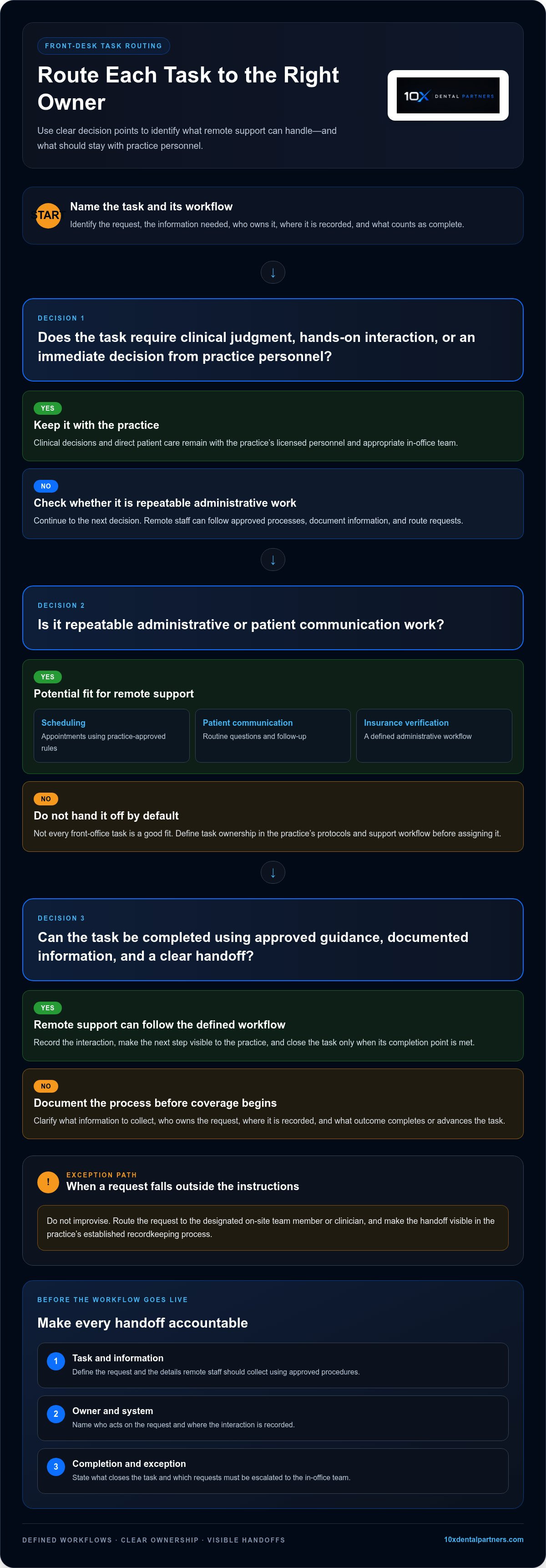
Not every front-office task is a good fit. Repeatable administrative work can often be documented and routed. Requests that require clinical judgment, hands-on interaction, or an immediate decision from practice personnel should stay with the appropriate in-office team. Define task ownership in the practice’s protocols and the support workflow.
What problems does outsourcing aim to solve?
The pressure is often visible in the daily queue: calls arrive while staff are checking in patients, appointment requests wait for a response, and follow-up slips behind other priorities. Delays can add friction at several points in the patient journey, from the first attempt to reach the practice through arranging the next visit.
Staffing gaps can compound the issue. When fewer people are available to manage administrative work, routine tasks may remain incomplete as on-site employees switch between phone coverage, patient needs, and desk responsibilities. Remote support can take on a defined portion of that workload, giving the practice a clearer way to assign each step and route requests back to the on-site team.
Outsourcing alone doesn’t resolve a fragmented process. If instructions are unclear or handoffs lack an owner, work can still stall, only in a different place. Before shifting tasks, define the queue, approved responses, documentation expectations, and escalation path. The workflow design and follow-through matter as much as the added coverage.
How Dental Front Desk Outsourcing Fits Into Daily Practice Workflows
Remote coverage works when it follows the practice’s operating rules rather than a separate playbook. Every request needs a defined path: who receives it, what information gets recorded, what happens next, and when the on-site team takes over. This structure adds administrative capacity while keeping patient communication visible to the practice.
Reliable remote coverage depends on clear task ownership, consistent handoffs, and defined escalation paths. Build these into the workflow before coverage begins.
Map tasks, systems, and handoffs before coverage begins
Start with recurring work, then document what “complete” means for each task. A useful workflow map identifies:
- The task: for example, handling an appointment request or completing a routine follow-up.
- The information needed: details remote staff should collect using practice-approved procedures.
- The owner and system: who acts on the request and where the interaction is recorded.
- The completion point: the outcome that closes the task or moves it to the next person.
- The exception path: which requests go to an on-site team member or clinician.
Remote staff should use the practice’s approved scheduling processes and communication guidance. If a patient asks for help beyond those instructions, staff need a clear transfer or escalation route instead of improvising. Define how information is documented and how the on-site team can see what remains open. Agree on each handoff before the workflow goes live.
Keep patient communication consistent across channels
Patients experience one practice, whether they call, leave a message, or receive follow-up. Set shared guidance for greeting callers, gathering appointment details, responding to routine questions, and recording next steps. Strong dental office phone skills are part of the workflow: staff need to listen carefully, communicate clearly, and recognize when a request falls outside their role.
Documentation should make each interaction useful to the next person. Record the reason for contact, the action taken, any promised follow-up, and whether the request needs escalation. Use the practice’s established recordkeeping process so remote and on-site staff can work from a consistent account instead of duplicating notes or relying on conflicting information.
Urgent, sensitive, or clinically specific questions need an explicit route to the appropriate practice personnel. Scripts should define what remote staff can say and where their responsibility ends. That boundary supports a consistent patient experience while keeping clinical decisions with the practice’s licensed team.
For practices building this model, virtual staffing and call center support can form part of a workflow-led operating plan. Define ownership and handoffs first, then align coverage to the process.
Outsourced vs. In-House Dental Front Desk: How to Assess the Trade-Offs
The choice isn’t simply between keeping control and giving it up. In-house, outsourced, and hybrid models distribute work differently. The right fit depends on how much work requires an on-site presence, which tasks follow repeatable processes, and how closely the practice needs to supervise each interaction. Assess dental front desk outsourcing against your actual workload, not a universal savings promise.
| Factor | In-house | Outsourced | Hybrid |
|---|---|---|---|
| Control | Direct, day-to-day supervision | Control through documented rules, reporting, and escalation | Shared ownership by task |
| Coverage | Based on onsite staffing and schedules | Assigned to a defined remote queue | Onsite presence plus remote task support |
| Management effort | Recruiting, training, and team oversight | Process setup and ongoing coordination | Coordination across onsite and remote roles |
| Continuity | Builds through ongoing team relationships | Depends on shared notes and consistent handoffs | Depends on aligned communication across both teams |
| Workflow fit | Strong for work requiring frequent in-person interaction | Best suited to documented, monitorable tasks | Separates in-person needs from repeatable administrative work |
When does in-house coverage make more sense?
In-house coverage may be the better fit when front-desk work involves frequent face-to-face interaction, close coordination with clinical staff, or rapid decisions that depend on being physically present. Existing team members may also know patient preferences and practice routines. Direct supervision allows for immediate coaching, but internal staffing still needs coverage plans, consistent processes, and clear task ownership.
When can outsourced or hybrid coverage fit?
Remote support can fit a queue of repeatable tasks that the practice can document, assign, and monitor. A hybrid model can keep check-in and other in-person needs with on-site staff while remote support handles defined administrative work, such as scheduling or routine patient communication. Clear communication rules and escalation ownership help the two teams work as one front desk.
Privacy and access controls are operational requirements in any model that involves patient information. Define which roles need access to which information, how interactions are recorded, and how access is managed. Before implementation, confirm the privacy and security obligations that apply to the practice and its service arrangement.
Compare models using practice-specific measures, such as unresolved requests, follow-up completion, scheduling accuracy, and the on-site team’s administrative workload. Review the same measures over time. This evidence can show whether the setup supports the patient experience and where the workflow needs refinement.
How to Implement Dental Front Desk Outsourcing in Five Practical Steps
A reliable rollout starts with the practice’s workload, not a promised launch date. Use these five steps to define a manageable scope, prepare the team, and assess whether the new workflow is working.
- Audit the workload. List recurring front-desk tasks and note when they occur, who handles them now, and where delays or backlogs appear. Establish a baseline for response handling, scheduling completion, and open administrative tasks so you can compare performance after implementation.
- Prioritize a defined queue. Choose a small group of repeatable administrative tasks with clear completion criteria, such as routine scheduling requests or follow-up. Keep clinical decisions and work requiring in-person interaction with the appropriate practice personnel. Expand the scope only after the initial queue is stable.
- Document the workflow. Write down approved scripts, scheduling rules, required documentation, escalation contacts, and handoff expectations. Specify what remote staff can resolve independently and what must return to an on-site team member or clinician.
- Onboard people and processes. Coordinate system access and privacy safeguards with the practice’s responsible personnel. Tell the on-site team which tasks are transferring, where updates will be recorded, and how exceptions will return to them. A clear handoff prevents parallel work and confusion about who owns the next action.
- Review and refine. Track the agreed measures consistently, then review exceptions with the people accountable for the workflow. Compare results with the baseline and gather staff and patient feedback to identify unclear instructions or communication friction. Adjust scope only after the core process is dependable.
These steps make dental front desk outsourcing an operational change the practice can evaluate, rather than a broad handoff with uncertain boundaries. For more ideas on structuring remote administrative support, explore this guide to virtual staffing for dental offices.
If your practice is defining its first remote task queue, explore virtual staffing support as part of a workflow-led approach.
Make Dental Front Desk Outsourcing Part of a Stronger Operating System
Dental front desk outsourcing is most useful when it strengthens a defined operating model. A strong fit has three foundations: repeatable administrative tasks, documented processes, and an internal owner who remains accountable for the patient experience. Remote support can carry out assigned work, while practice leadership sets priorities, resolves operational issues, and reviews results.
This distinction matters when assessing ROI. Consistent scheduling coordination and patient follow-up can support the workflows that connect inquiries, appointments, and ongoing care. They don’t guarantee production, case acceptance, or financial results. Instead, they help the practice execute its processes consistently and identify where requests stall or handoffs break down. For a broader view of how operational processes relate to revenue, see this framework for dental practice revenue optimization.
Connect front-desk support to revenue and patient experience
Start by linking administrative tasks to their intended operational outcome. For example, a scheduling workflow should make clear how requests are handled, recorded, and followed through. A patient communication process should define who owns the next step when a question can’t be resolved through routine guidance. Reviewing these processes together helps leaders see whether remote support contributes to continuity, not just completion of isolated tasks.
Explore 10X Remote Assist for support with scheduling, patient communication, and insurance verification. Set the scope to match the practice’s workflow and preserve clear internal ownership.
Know when the operating model needs to evolve
Reassess the setup as the practice changes. Additional locations may require more consistent processes across teams. Shifting call volumes may change which tasks need coverage, while new service lines or staffing needs may create different handoffs. Review the workload, open tasks, and service measures before changing the scope. Expand or adjust support only when the revised workflow has a clear owner and can be monitored.
For practices managing growth across locations, this resource on DSO infrastructure development explores the operating structure behind multi-location complexity.
The decision comes back to four disciplines: match tasks to the right support model, integrate the work into established processes, retain internal oversight, and review performance as needs change. Outsourced support can add capacity, but durable execution depends on a practice-led system that keeps every responsibility visible and accountable.
Build Front-Desk Support Around Your Practice
Effective dental front desk outsourcing starts with work that can be clearly defined, then connects it to practice workflows through documented handoffs and an accountable internal owner. The right model may be in-house, remote, or hybrid. What matters is consistent patient communication and keeping clinical decisions with the practice’s licensed team.
Start with a defined administrative queue, establish baseline measures, and review results before expanding the scope. This gives your team a practical way to assess fit and refine the operating model without assuming outsourcing alone will improve financial performance.
10X Remote Assist supports scheduling, patient communication, and insurance verification. 10X Dental Partners also provides call center and broader practice operations support. Explore 10X Remote Assist to see how virtual support can fit into a structured approach. A clear process is the first step toward a more coordinated front desk.
Frequently Asked Questions
What does dental front desk outsourcing include?
Dental front desk outsourcing provides remote administrative support for selected practice workflows. Tasks may include scheduling appointments, handling routine patient communication, and verifying insurance information. Responsibilities depend on the workflow agreed between the practice and its support team, including how requests are documented and escalated. Remote staff support administration, not clinical care. Clinical decisions and direct patient care remain with the practice’s licensed personnel.
Can a virtual dental receptionist schedule appointments?
Yes, remote staff can support appointment requests and scheduling when the practice authorizes the work and provides training on its scheduling rules. They also need a defined process for accessing and updating the appropriate systems. The practice should specify how to handle unavailable appointment times, scheduling exceptions, and requests involving clinical triage. Clear procedures help remote staff manage routine scheduling and route questions that require practice personnel.
Is dental front desk outsourcing appropriate for a small practice?
Practice size alone doesn’t determine whether outsourcing is a good fit. Consider the recurring administrative workload, coverage gaps, whether tasks can be documented, and who will oversee remote support internally. A small practice can start with a narrow task set, such as a defined scheduling or follow-up queue, then review whether it improves continuity without creating more coordination work for the on-site team.
How does outsourced dental front-desk support work with our existing team?
Outsourced support works alongside an existing team through defined task ownership, communication channels, documentation standards, and escalation paths. On-site staff retain work requiring physical presence or clinical judgment, while remote staff handle agreed administrative tasks. During onboarding, clarify which requests transfer, where updates are recorded, and how exceptions return to the practice. Regular early reviews help the team identify and resolve handoff problems.
Is dental front desk outsourcing secure and HIPAA compliant?
Security and compliance depend on the specific workflow and service arrangement, so don’t assume outsourcing alone ensures compliance. The practice should work with its responsible compliance personnel to establish appropriate access controls, privacy safeguards, staff training, and documented procedures for handling patient information. Identify what information remote staff need and how it may be accessed and recorded. Verify the obligations that apply to the arrangement before implementation.
How do I know whether outsourcing is working for my dental office?
Choose baseline measures tied to the work being outsourced, such as response handling, scheduling completion, follow-up status, and unresolved tasks. Review trends and exceptions with the team rather than relying on a single metric. Staff feedback can reveal duplicated work or unclear handoffs, while patient feedback may point to communication friction. Compare results with the practice’s starting point before drawing conclusions about performance or financial impact.
Can dental front desk outsourcing help with missed calls?
Remote coverage can support defined call-handling, follow-up, and routing workflows when the practice sets clear coverage expectations and escalation rules. Start by reviewing call patterns and unresolved requests to identify where support could fit. Establish how messages are documented, who follows up, and which calls need on-site attention. Outsourcing can add structure to call handling, but it doesn’t guarantee every call will be answered or increase appointments.


